
การตรวจสอบบริการ Network ที่ Debian ใช้อยู่
ตั้งแต่ Debian 9 ขึ้นไป ระบบเครือข่ายใช้ systemd-networkd หรือ NetworkManager แล้วแต่การตั้งค่า
– เช็กว่าเครื่องใช้ NetworkManager ไหม
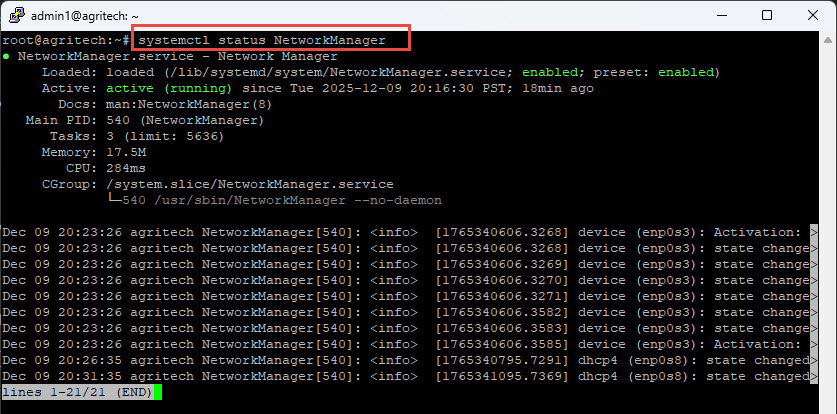
– เช็กว่าใช้ systemd-networkd ไหม
ตรวจสอบว่าระบบได้ IP หรือยัง
– หลังจาก restart network ให้ตรวจสอบ:
– ดูสถานะ routing
– ทดสอบ DNS
หรือ
– ลองตรวจอุปกรณ์
- ถ้ายังไม่เห็น ให้ตรวจ dmesg
แล้วตรวจว่า VirtualBox / VMware / Hyper-V เปิด Network Adapter ไว้หรือไม่
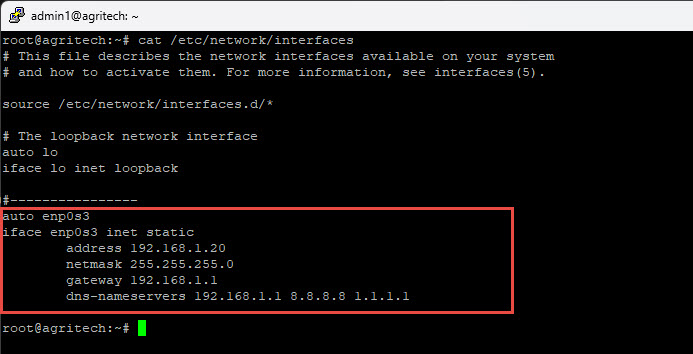
หากต้องการ Static IP สำหรับ enp0s3
ตัวอย่างสำหรับระบบ legacy /etc/network/interfaces
auto enp0s3
iface enp0s3 inet static
address 192.168.1.20
netmask 255.255.255.0
gateway 192.168.1.1
dns-nameservers 192.168.1.1 8.8.8.8 1.1.1.1
iface enp0s3 inet static
address 192.168.1.20
netmask 255.255.255.0
gateway 192.168.1.1
dns-nameservers 192.168.1.1 8.8.8.8 1.1.1.1
รีสตาร์ท
– ตรวจสอบสถานะ
—–
SYSADMIN KNOWLEDGE
https://www.sysadmin.in.th
SYSADMIN KNOWLEDGE
https://www.sysadmin.in.th