
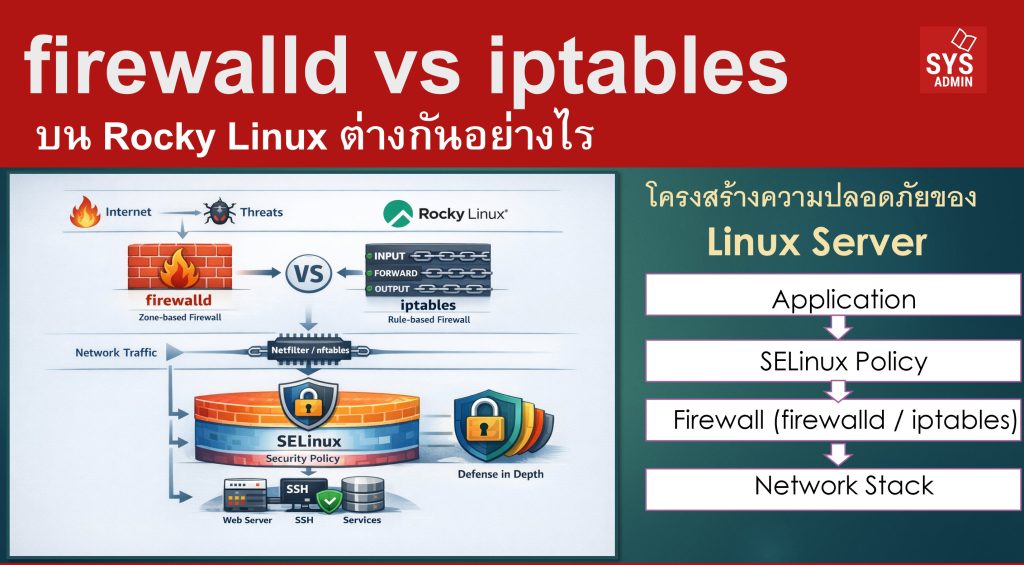

ในระบบ Linux Server โดยเฉพาะดิสทริบิวชันสาย Enterprise เช่น Rocky Linux หนึ่งในหัวใจของการรักษาความปลอดภัยคือ Firewall ซึ่งทำหน้าที่ควบคุมการเข้า-ออกของ Network Traffic
ในอดีตผู้ดูแลระบบนิยมใช้ iptables เป็นหลัก แต่ในระบบ Linux รุ่นใหม่ เช่น Rocky Linux, RHEL และ CentOS Stream ได้เปลี่ยนมาใช้ firewalld เป็นค่าเริ่มต้น ขณะเดียวกันระบบป้องกันอีกชั้นหนึ่งที่สำคัญคือ SELinux ซึ่งทำงานในระดับ Operating System Security Policy ดังนั้นโครงสร้างความปลอดภัยของ Linux Server จะมีหลาย Layer เช่น
SELinux Policy
↓
Firewall (firewalld / iptables)
↓
Network Stack
บทความนี้จะอธิบายความแตกต่างระหว่าง firewalld vs iptables และบทบาทของทั้งสองเมื่อทำงานร่วมกับ SELinux
1. iptables คืออะไร
iptables คือเครื่องมือ Firewall แบบดั้งเดิมของ Linux ที่ทำงานผ่าน Netfilter framework ภายใน Kernel
iptables ทำงานโดยการสร้าง Rules เพื่อกำหนดว่าควรทำอย่างไรกับ Packet ที่เข้ามา เช่น
- ACCEPT → อนุญาต
- DROP → ปฏิเสธ
- REJECT → ปฏิเสธพร้อมตอบกลับ
โครงสร้างหลักของ iptables
iptables ใช้ระบบ Table และ Chain
├── filter
├── nat
└── mangle
Chains
├── INPUT
├── OUTPUT
└── FORWARD
- ควบคุมได้ละเอียดระดับ packet
- ใช้ได้กับระบบ Linux เกือบทุกตัว
- เหมาะกับ automation และ scripting
ข้อจำกัด
- คำสั่งซับซ้อน
- การเปลี่ยน rule อาจต้อง reload firewall
- จัดการยากเมื่อ rule จำนวนมาก
2. firewalld คืออะไร
firewalld คือ Firewall Management Tool รุ่นใหม่ที่พัฒนาเพื่อให้ใช้งานง่ายขึ้น
ใน Rocky Linux และ RHEL จะใช้ firewalld เป็นค่า default
จุดสำคัญคือ
แนวคิดหลักของ firewalld : Zones
firewalld ใช้แนวคิด Zone-based firewall
ตัวอย่าง zone
| Zone | ความหมาย |
|---|---|
| public | เครือข่ายทั่วไป |
| home | เครือข่ายในบ้าน |
| work | เครือข่ายองค์กร |
| trusted | เครือข่ายที่เชื่อถือ |
ตัวอย่างคำสั่งเปิด port
3. เปรียบเทียบ firewalld vs iptables
| Feature | firewalld | iptables |
|---|---|---|
| Interface | ใช้งานง่าย | command line ล้วน |
| Configuration | zone-based | rule-based |
| Reload | เปลี่ยนค่าแบบ runtime ได้ | ต้อง reload |
| Management | เหมาะกับระบบใหม่ | ใช้ในระบบ legacy |
| Complexity | ง่ายกว่า | ซับซ้อนกว่า |
| Default ใน Rocky Linux | ✔ ใช้ | ✖ ไม่ใช้เป็น default |
สรุปง่าย ๆ
4. firewalld และ iptables ทำงานร่วมกันอย่างไร
ใน Rocky Linux รุ่นใหม่
nftables / iptables backend
↓
Linux Kernel Netfilter
firewalld จะ translate rule ให้ kernel firewall
ดังนั้นแม้ใช้ firewalld จริง ๆ ก็ยังมี iptables / nftables อยู่เบื้องหลัง
5. Firewall กับ SELinux ทำงานคนละ Layer
ผู้ดูแลระบบ Linux มักสับสนระหว่าง Firewall และ SELinux
จริง ๆ แล้วทำงานคนละหน้าที่
| ระบบ | หน้าที่ |
|---|---|
| Firewall | ควบคุม Network Traffic |
| SELinux | ควบคุม Process Permission |
ตัวอย่างสถานการณ์จริง
สมมุติว่าเปิด port 80 แล้ว
สาเหตุอาจเป็น
6. Security Stack ของ Rocky Linux
เมื่อรวมทุก layer แล้ว
Firewall (firewalld)
↓
Kernel Network Stack
↓
SELinux Policy
↓
Application (Apache / Nginx / SSH)
แม้ firewall เปิด port แล้ว
SELinux ก็ยังสามารถ block process ได้
ซึ่งเป็นแนวคิด Defense in Depth
สรุป
- iptables คือ firewall engine แบบดั้งเดิมของ Linux
- firewalld คือเครื่องมือจัดการ firewall ที่ใช้งานง่ายกว่า
- Rocky Linux ใช้ firewalld เป็นค่าเริ่มต้น
- firewalld ทำงานบน backend เช่น iptables หรือ nftables
- SELinux เป็น security layer อีกระดับหนึ่ง ที่ควบคุม process และ resource
ดังนั้นในระบบ Linux Server สมัยใหม่
—
Write by SysAdmin Knowledge
https://www.sysadmin.in.th
March 26, 2026